Spaceborne-Ground Radar Calibration (Application)#
In this tutorial, we demonstrate how to exploit GPM-API along with other radar software to match reflectivities measurements of spaceborne (SR) and ground (GR) radars and assess the GR calibration bias.
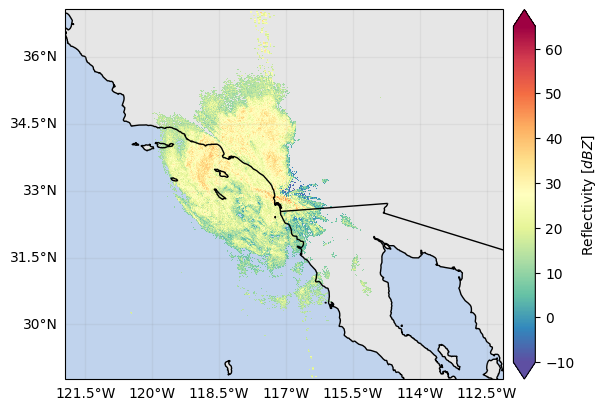
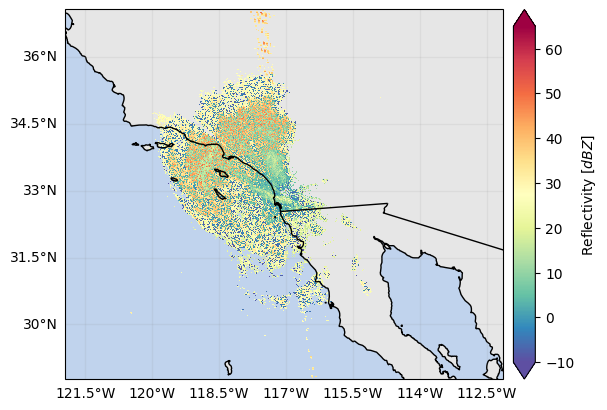
As example, we analyze a coincident GPM DPR and NEXRAD overpass over San Diego, USA, during the landfall of Tropical Storm Hilary in 2023. The NEXRAD KNKX radar data appears to be significantly miscalibrated and we will assess the calibration bias.
NEXRAD data of interest are download from the AWS bucket using radar_api and read into xarray using xradar. GPM data are download using GPM-API and the volume_matching routine is used to match the SR and GR data.
Note that the GPM-API’s volume_matching routine can automatically download and open the coincident GPM overpass data if the SR dataset is not provided to the function.
Please read the Spaceborne-Ground Radar Matching Tutorial for a step-by-step guide through the process of obtaining spatially and temporally coincident radar samples.
Relevant software#
To run this tutorial, it is necessary to install additional libraries which are not automatically required by GPM-API. The libraries are xradar, wradlib, geopandas, radar_api, fsspec, s3fs,
folium. You can install them with terminal command conda install -c conda-forge radar_api xradar wradlib geopandas fsspec s3fs folium
If you have such libraries installed, you can start importing the required packages:
[ ]:
import warnings
warnings.filterwarnings("ignore")
from functools import reduce
import cartopy.crs as ccrs
import fsspec
import numpy as np
import radar_api
import xradar as xd
from IPython.display import display
from gpm.gv import (
calibration_summary,
compare_maps,
reflectivity_scatterplots,
volume_matching,
)
np.set_printoptions(suppress=True)
Read GR data#
In this tutorial, we use a coincident GPM DPR/NEXRAD overpass over San Diego (USA) during the landfall of Tropical Storm Hilary in 2023. Let’s load manually the GR scanning volume of interest from the AWS S3 bucket.
[ ]:
filepath = "noaa-nexrad-level2/2023/08/20/KNKX/KNKX20230820_221341_V06"
file = fsspec.open_local(
f"simplecache::s3://{filepath}",
s3={"anon": True},
filecache={"cache_storage": "."},
)
dt_gr = xd.io.open_nexradlevel2_datatree(file)
As alternative, you can search for GR data files using radar_api and then either download or directly open the file using the xradar wrapper within radar_api.
[ ]:
start_time = "2023-08-20 22:13:40"
end_time = "2023-08-20 22:20:00"
filepaths = radar_api.find_files(
network="NEXRAD",
radar="KNKX",
start_time=start_time,
end_time=end_time,
verbose=False,
)
print(filepaths)
filepath = filepaths[1]
print(filepath)
['s3://noaa-nexrad-level2/2023/08/20/KNKX/KNKX20230820_220808_V06', 's3://noaa-nexrad-level2/2023/08/20/KNKX/KNKX20230820_221341_V06', 's3://noaa-nexrad-level2/2023/08/20/KNKX/KNKX20230820_221914_V06']
s3://noaa-nexrad-level2/2023/08/20/KNKX/KNKX20230820_221341_V06
[ ]:
dt_gr = radar_api.open_datatree(filepath, network="NEXRAD")
Now, let’s select a GR sweep to match with GPM DPR
[ ]:
sweep_idx = 0
sweep_group = f"sweep_{sweep_idx}" # GR sweep (elevation to be used)
ds_gr = dt_gr[sweep_group].to_dataset().compute()
and display the horizontally polarized reflectivity field:
[ ]:
ds_gr["DBZH"].where(ds_gr["DBZH"] > -10).xradar_dev.plot_map()
<cartopy.mpl.geocollection.GeoQuadMesh at 0x7f9c28eed250>
Run SR/GR volume matching#
Here we start defining the required settings for the SR/GR volume matching procedure:
The GR
radar_bandcontrols to which frequency SR Ku-band reflectivities will be converted. Valid values areX,C,S,Ku.The
beamwidth_grrefers to the angular beam width of the GR.The minimum reflectivity thresholds
z_min_threshold_srandz_min_threshold_grare used to mask out SR and GR gates belows such thresholds.
[ ]:
radar_band = "S"
beamwidth_gr = 1
z_min_threshold_gr = 0
z_min_threshold_sr = 10
The SR/GR volume matching routine typically takes around 40-50 seconds to complete. It returns a geopandas.DataFrame with the matched aggregated reflectivities and the associated statistics.
[ ]:
gdf_match = volume_matching(
ds_gr=ds_gr,
z_variable_gr="DBZH",
radar_band=radar_band,
beamwidth_gr=beamwidth_gr,
z_min_threshold_gr=z_min_threshold_gr,
z_min_threshold_sr=z_min_threshold_sr,
min_gr_range=0,
max_gr_range=150_000,
# gr_sensitivity_thresholds=None,
# sr_sensitivity_thresholds=None,
download_sr=True, # require internet connection !
display_quicklook=True,
)
# Note: The circle radius in the quicklook represents the 15 km and max_gr_range distances.
All the available GPM 2A-DPR product files are already on disk.
Integrity checking of GPM files has completed.
All the available GPM 1B-Ku product files are already on disk.
Integrity checking of GPM files has completed.

SR/GR Matching Elapsed time: 0:01:16.207764 .
[ ]:
display(gdf_match)
| GR_Z_mean | GR_Z_std | GR_Z_max | GR_Z_min | GR_Z_range | GR_Z_cov | GR_time | GR_gate_volume_sum | GR_fraction_covered_area | GR_counts | ... | sweep_fixed_angle | along_track | cross_track | VolumeRatio | VolumeDiff | time_difference | GR_z_lower_bound | GR_z_upper_bound | SR_z_lower_bound | SR_z_upper_bound | |
|---|---|---|---|---|---|---|---|---|---|---|---|---|---|---|---|---|---|---|---|---|---|
| 0 | 15.100328 | 2.405542 | 19.5 | 8.5 | 11.0 | 0.159304 | 2023-08-20 22:13:43.619000064 | 1.324878e+09 | 0.523921 | 50.0 | ... | 0.483398 | 98 | 42 | 44.679571 | 5.787012e+10 | 97 | 1535.964343 | 4204.783950 | 1654.094116 | 4209.583984 |
| 1 | 13.289946 | 2.324646 | 18.5 | 6.5 | 12.0 | 0.174918 | 2023-08-20 22:13:43.513999872 | 1.314559e+09 | 0.792669 | 74.0 | ... | 0.483398 | 98 | 43 | 45.585145 | 5.860982e+10 | 97 | 1515.361516 | 4199.699750 | 1558.925415 | 4227.430664 |
| 2 | 16.295664 | 3.504062 | 23.0 | 6.0 | 17.0 | 0.215030 | 2023-08-20 22:13:43.414000128 | 1.303967e+09 | 0.966467 | 92.0 | ... | 0.483398 | 98 | 44 | 46.532491 | 5.937285e+10 | 97 | 1495.031559 | 4194.460201 | 1605.041138 | 4143.421875 |
| 3 | 19.697226 | 4.036701 | 26.0 | 5.0 | 21.0 | 0.204938 | 2023-08-20 22:13:43.315000064 | 1.291230e+09 | 1.000000 | 98.0 | ... | 0.483398 | 98 | 45 | 45.354210 | 5.727147e+10 | 97 | 1475.893415 | 4181.632853 | 1647.520386 | 4056.250488 |
| 4 | 19.018411 | 3.410486 | 24.5 | 9.5 | 15.0 | 0.179326 | 2023-08-20 22:13:43.212000000 | 1.280514e+09 | 1.000000 | 97.0 | ... | 0.483398 | 98 | 46 | 44.031053 | 5.510187e+10 | 97 | 1468.543682 | 4156.803848 | 1811.275757 | 4090.862549 |
| ... | ... | ... | ... | ... | ... | ... | ... | ... | ... | ... | ... | ... | ... | ... | ... | ... | ... | ... | ... | ... | ... |
| 1038 | 17.190318 | 3.090927 | 22.5 | 7.0 | 15.5 | 0.179806 | 2023-08-20 22:13:50.860999936 | 1.312649e+09 | 0.846275 | 74.0 | ... | 0.483398 | 155 | 39 | 12.468087 | 1.505358e+10 | 64 | 1509.901099 | 4198.756713 | 3403.228027 | 4139.753906 |
| 1039 | 16.530711 | 3.806119 | 22.5 | 4.0 | 18.5 | 0.230245 | 2023-08-20 22:13:50.963000064 | 1.281359e+09 | 1.000000 | 94.0 | ... | 0.483398 | 155 | 40 | 6.443431 | 6.974989e+09 | 64 | 1468.120593 | 4157.226937 | 3783.374756 | 4150.641113 |
| 1040 | 5.893002 | 1.561805 | 9.0 | 4.0 | 5.0 | 0.265027 | 2023-08-20 22:13:51.091000064 | 1.262083e+09 | 1.000000 | 95.0 | ... | 0.483398 | 155 | 41 | 6.614890 | 7.086455e+09 | 65 | 1427.293448 | 4095.952596 | 3685.078369 | 4051.276123 |
| 1045 | 3.531114 | 0.499994 | 4.0 | 3.0 | 1.0 | 0.141597 | 2023-08-20 22:13:51.857999872 | 1.058070e+09 | 1.000000 | 103.0 | ... | 0.483398 | 155 | 48 | 28.967377 | 2.959143e+10 | 65 | 1301.113630 | 3756.150436 | 2516.499268 | 3706.372314 |
| 1046 | 5.938911 | 2.127853 | 7.5 | 3.0 | 4.5 | 0.358290 | 2023-08-20 22:13:51.116000000 | 1.325865e+09 | 0.742812 | 68.0 | ... | 0.483398 | 156 | 41 | 10.494452 | 1.258836e+10 | 65 | 1516.193419 | 4205.278647 | 3574.987549 | 4185.318359 |
1016 rows × 230 columns
Analyse SR/GR database#
Now let’s first define the variables names of the SR and GR reflectivities:
[ ]:
sr_z_column = f"SR_zFactorFinal_{radar_band}_mean"
gr_z_column = "GR_Z_mean"
Compare spatial reflectivity fields#
Here we start comparing the spatial reflectivity fields without applying restrictive filtering criteria:
[ ]:
fig = compare_maps(
gdf_match,
sr_column=sr_z_column,
gr_column=gr_z_column,
sr_label="SR Reflectivity (dBz)",
gr_label="GR Reflectivity (dBz)",
cmap="Spectral_r",
unified_color_scale=True,
vmin=15,
# vmax=40
)
fig.tight_layout()
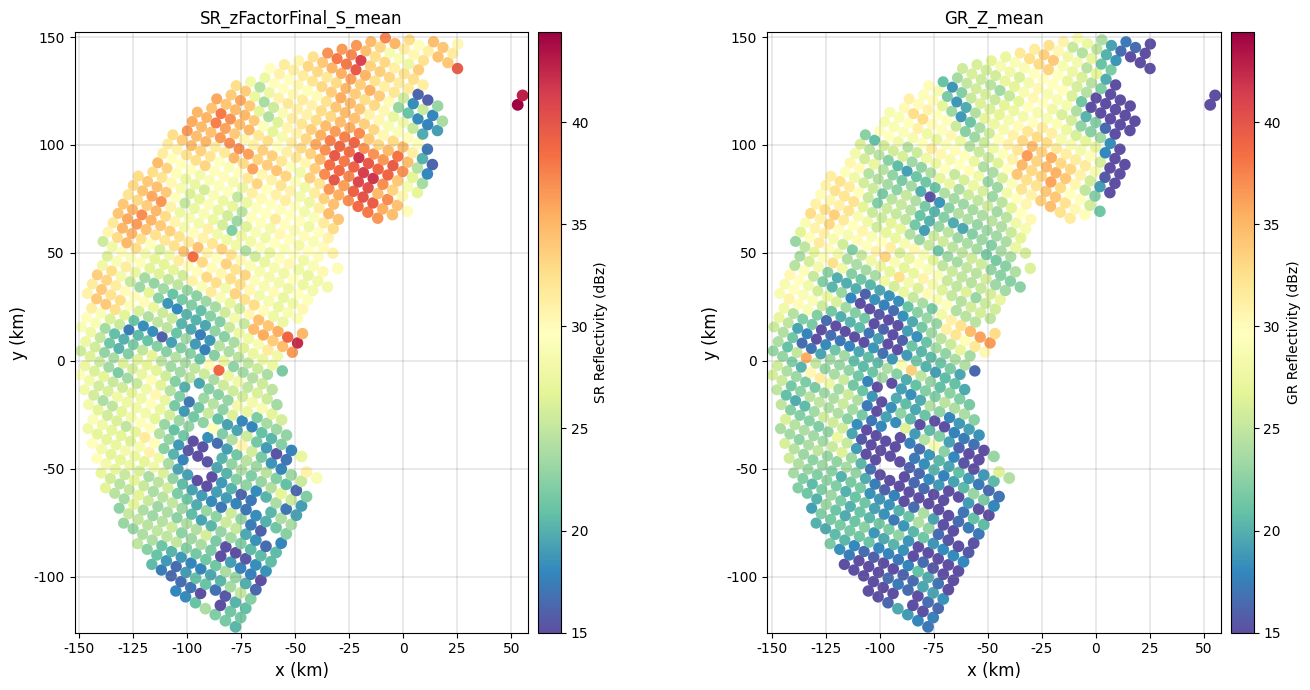
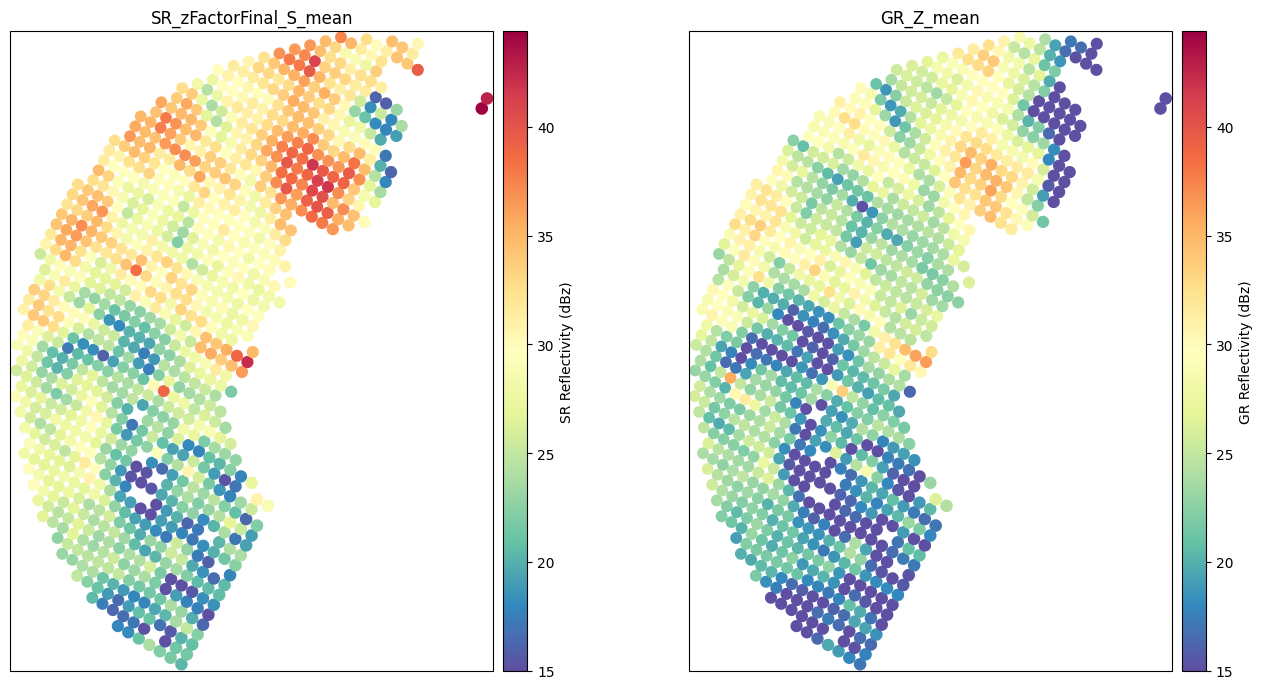
If you wish to create a cartopy map, specify the 'projection' in the subplot_kwargs argument:
[ ]:
ccrs_gr_aeqd = ccrs.AzimuthalEquidistant(
central_longitude=ds_gr["longitude"].item(),
central_latitude=ds_gr["latitude"].item(),
)
subplot_kwargs = {}
subplot_kwargs["projection"] = ccrs_gr_aeqd
fig = compare_maps(
gdf_match,
sr_column=sr_z_column,
gr_column=gr_z_column,
sr_label="SR Reflectivity (dBz)",
gr_label="GR Reflectivity (dBz)",
cmap="Spectral_r",
unified_color_scale=True,
vmin=15,
# vmax=40
subplot_kwargs=subplot_kwargs,
)
fig.tight_layout()
Here we show how to explore interactively the reflectivity fields using Folium:
[ ]:
gdf_match.explore(column="GR_Z_mean", legend=True, cmap="Spectral_r", vmin=0, vmax=40)
Generate calibration summary#
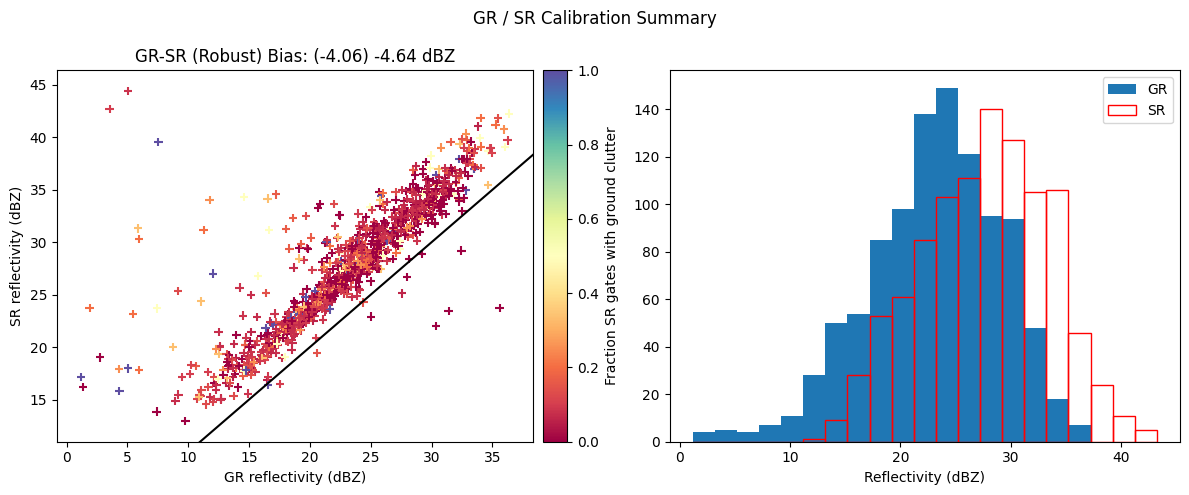
We now create a figure comparing SR/GR aggregated reflectivities volume-by-volume and displaying the overall distributions.
[ ]:
gr_z_column = "GR_Z_mean"
sr_z_column = f"SR_zFactorFinal_{radar_band}_mean"
fig = calibration_summary(
df=gdf_match,
gr_z_column=gr_z_column,
sr_z_column=sr_z_column,
# Histogram options
bin_width=2,
# Scatterplot options
hue_column="SR_fraction_clutter",
# gr_range=[15, 50]
# sr_range=[15, 50]
marker="+",
cmap="Spectral",
)
fig.tight_layout()
Investigate filtering criteria#
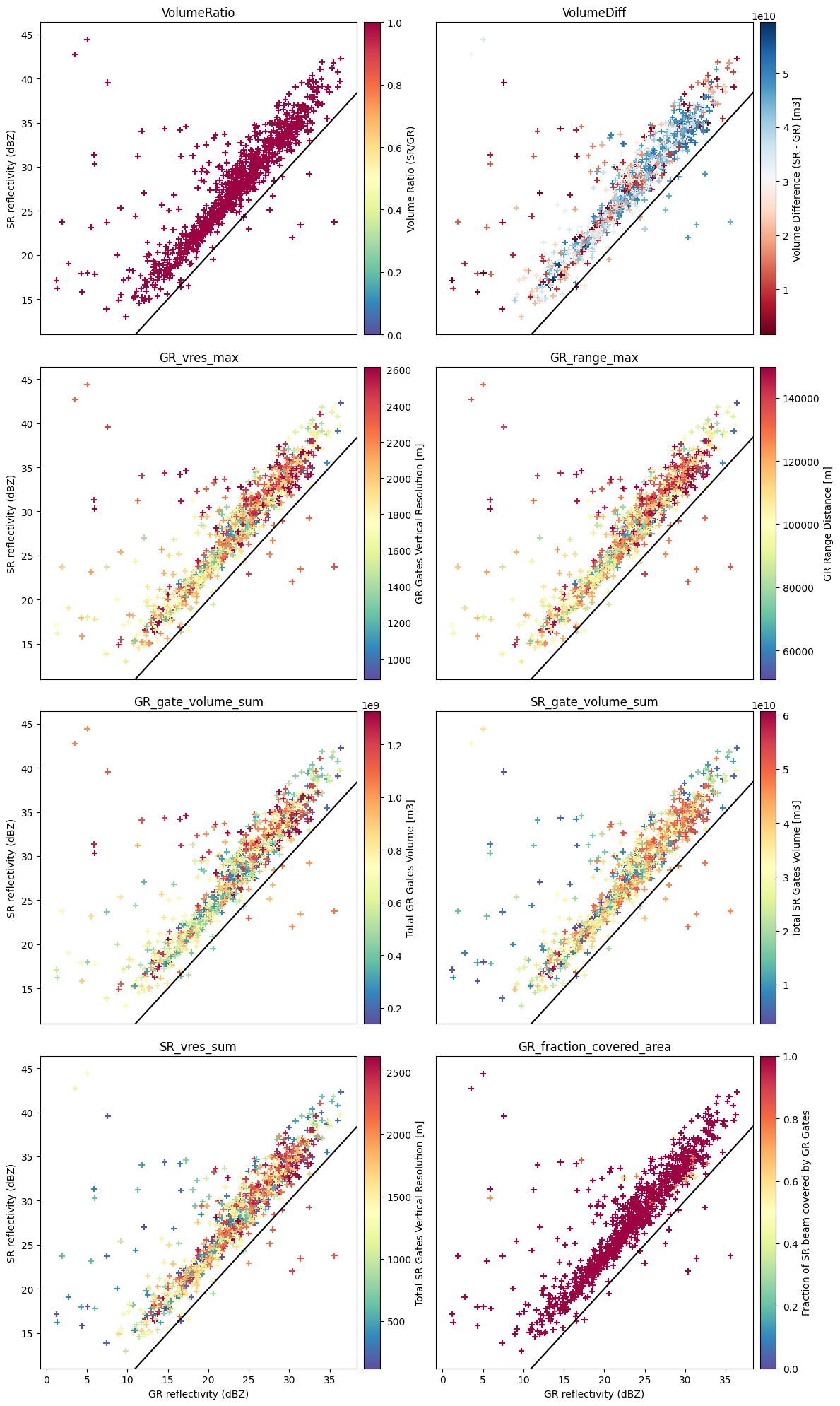
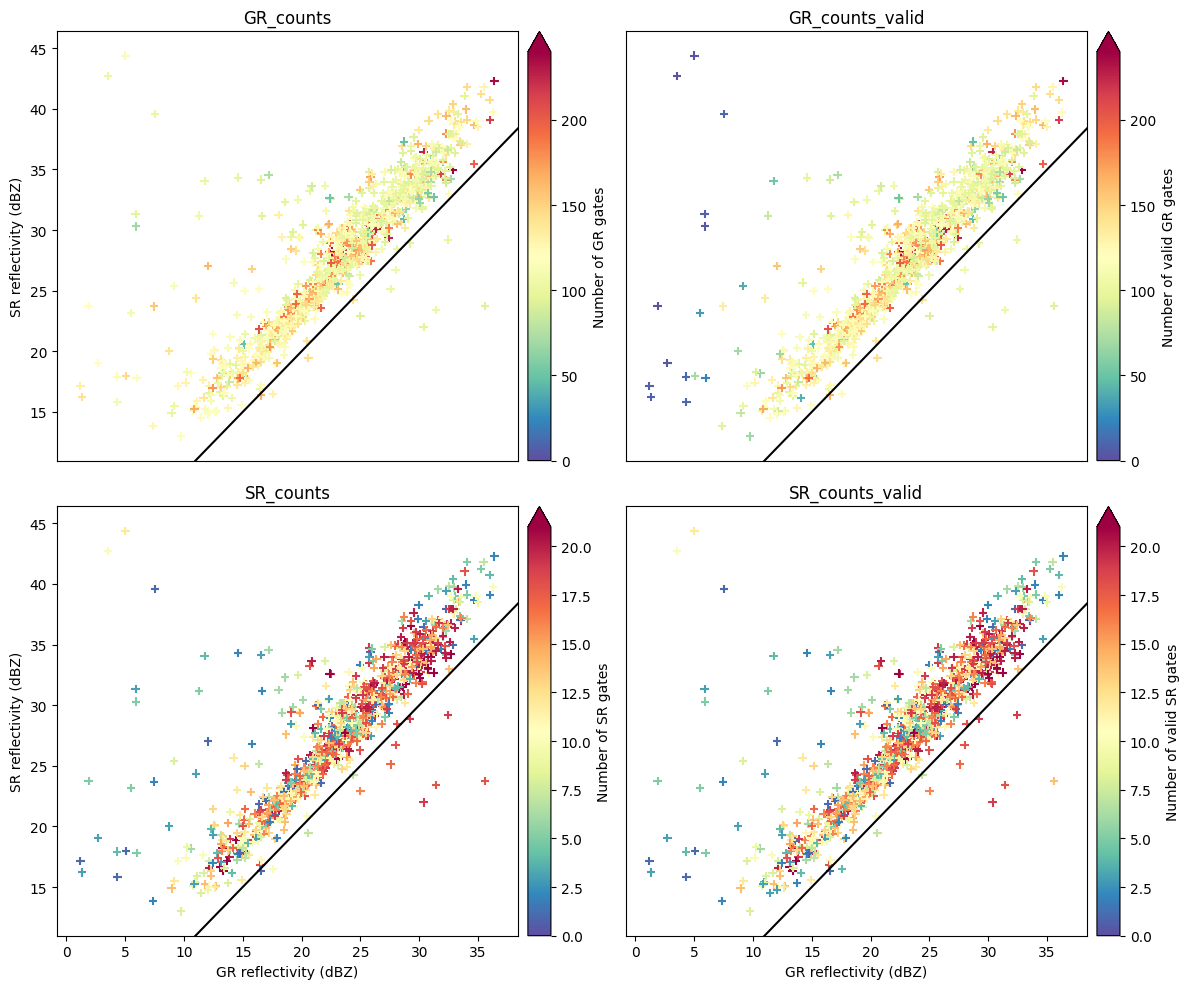
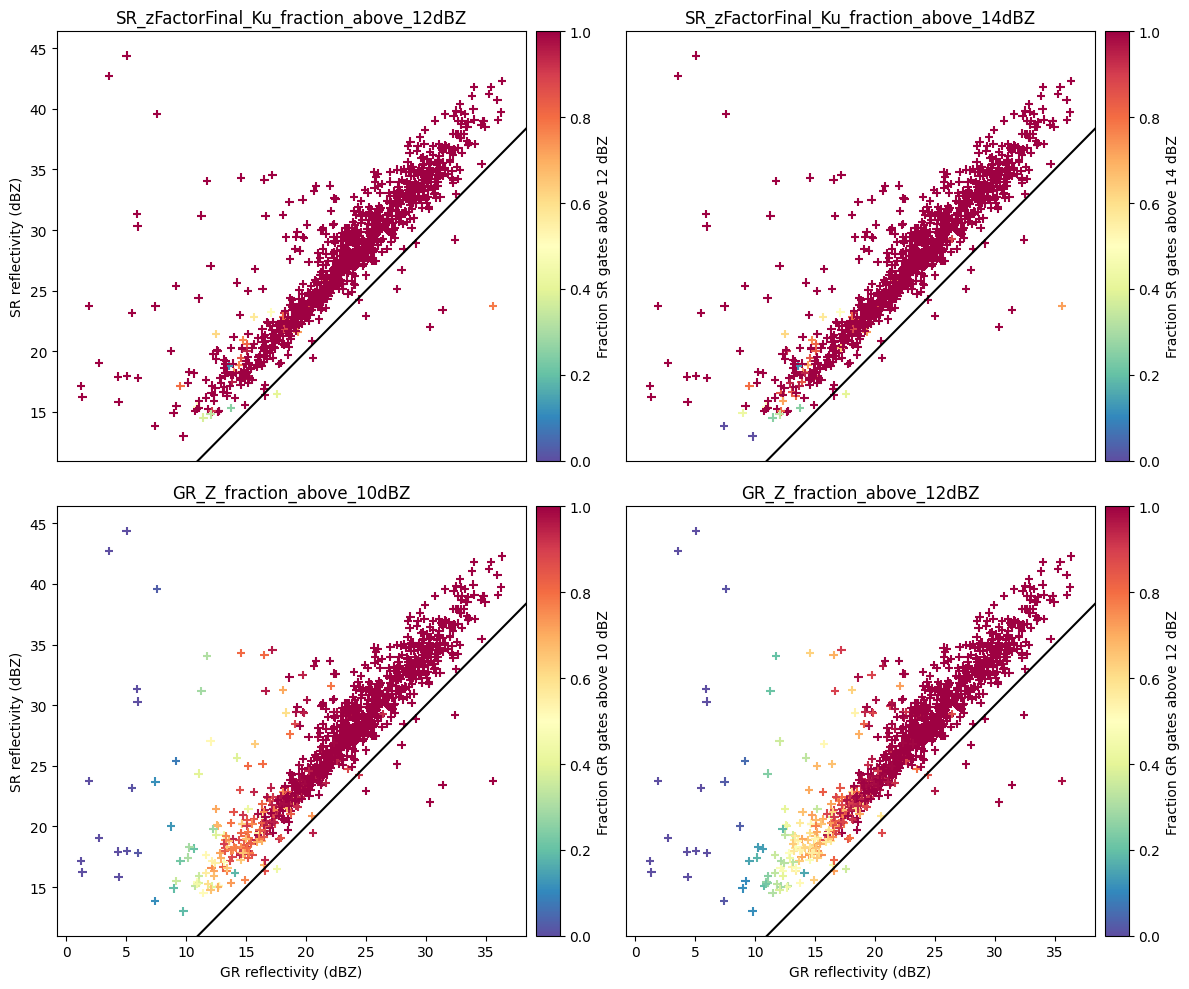
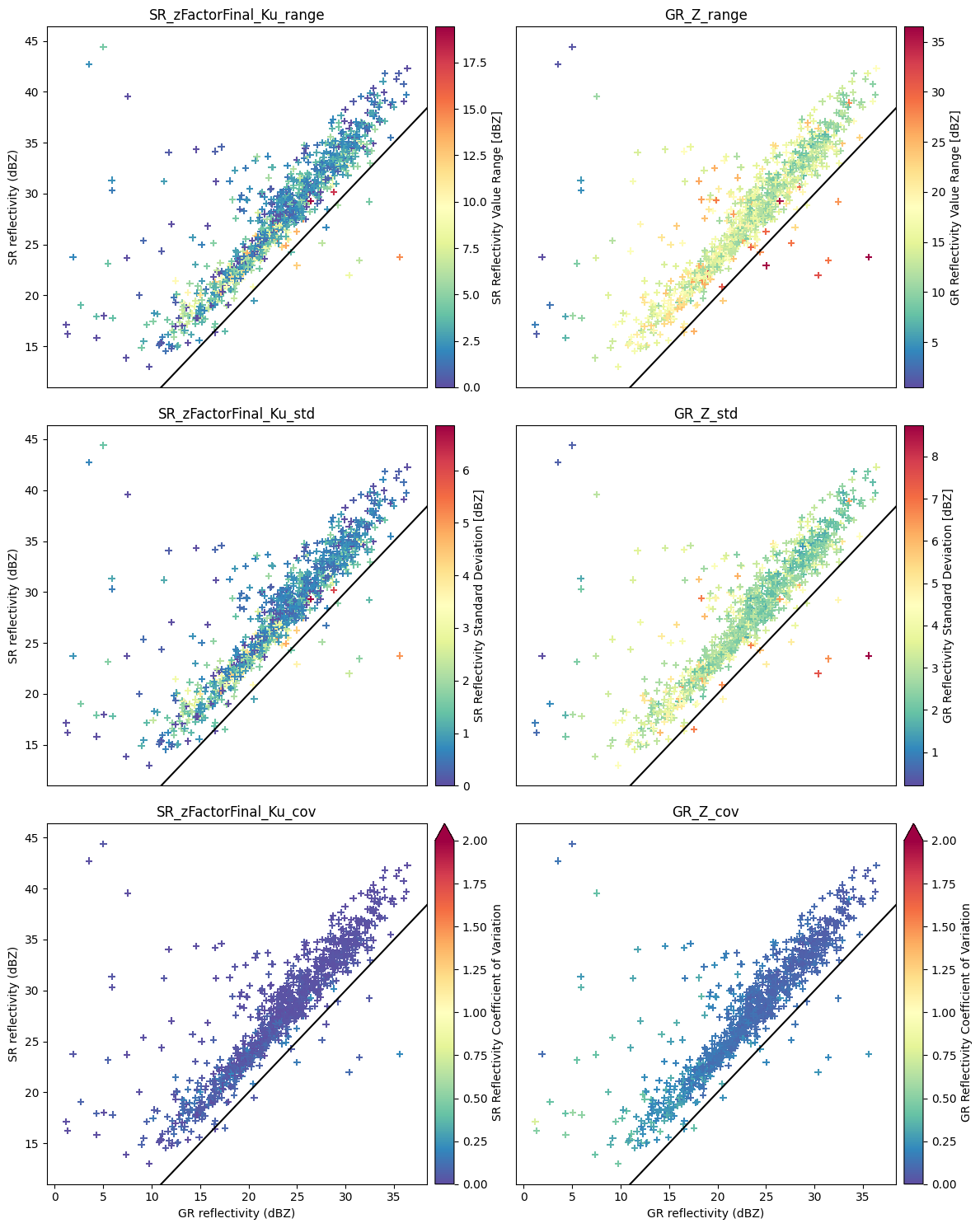
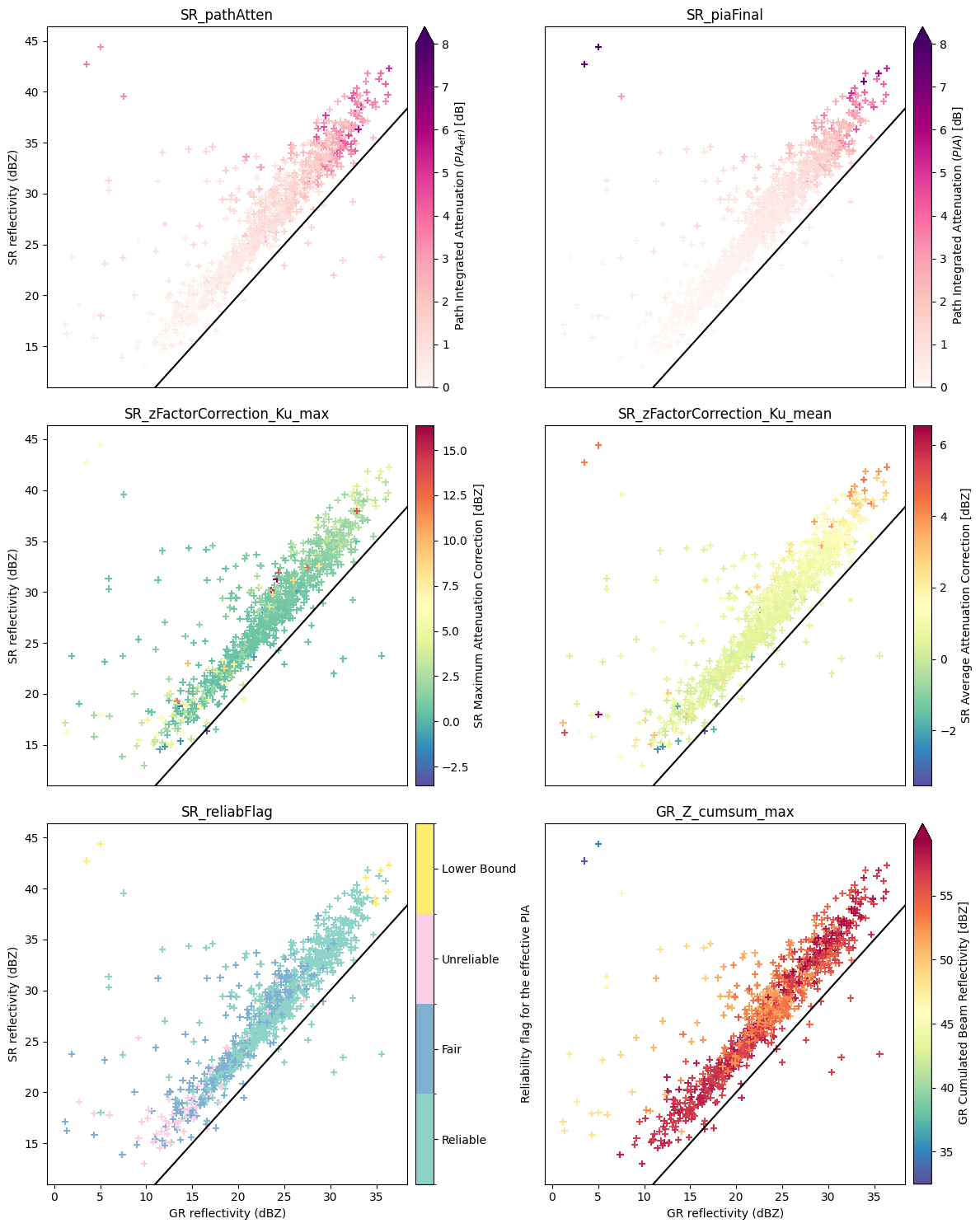
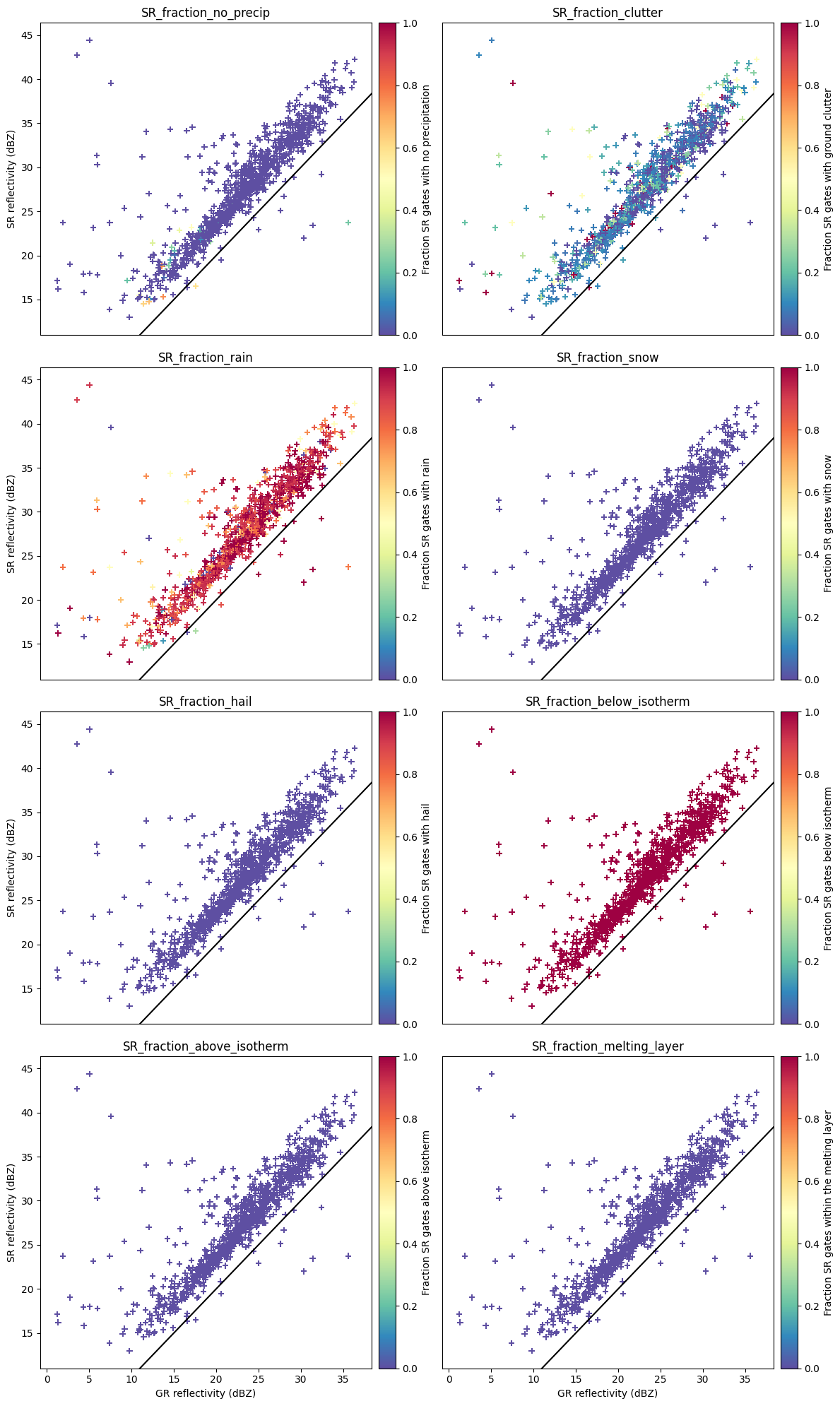
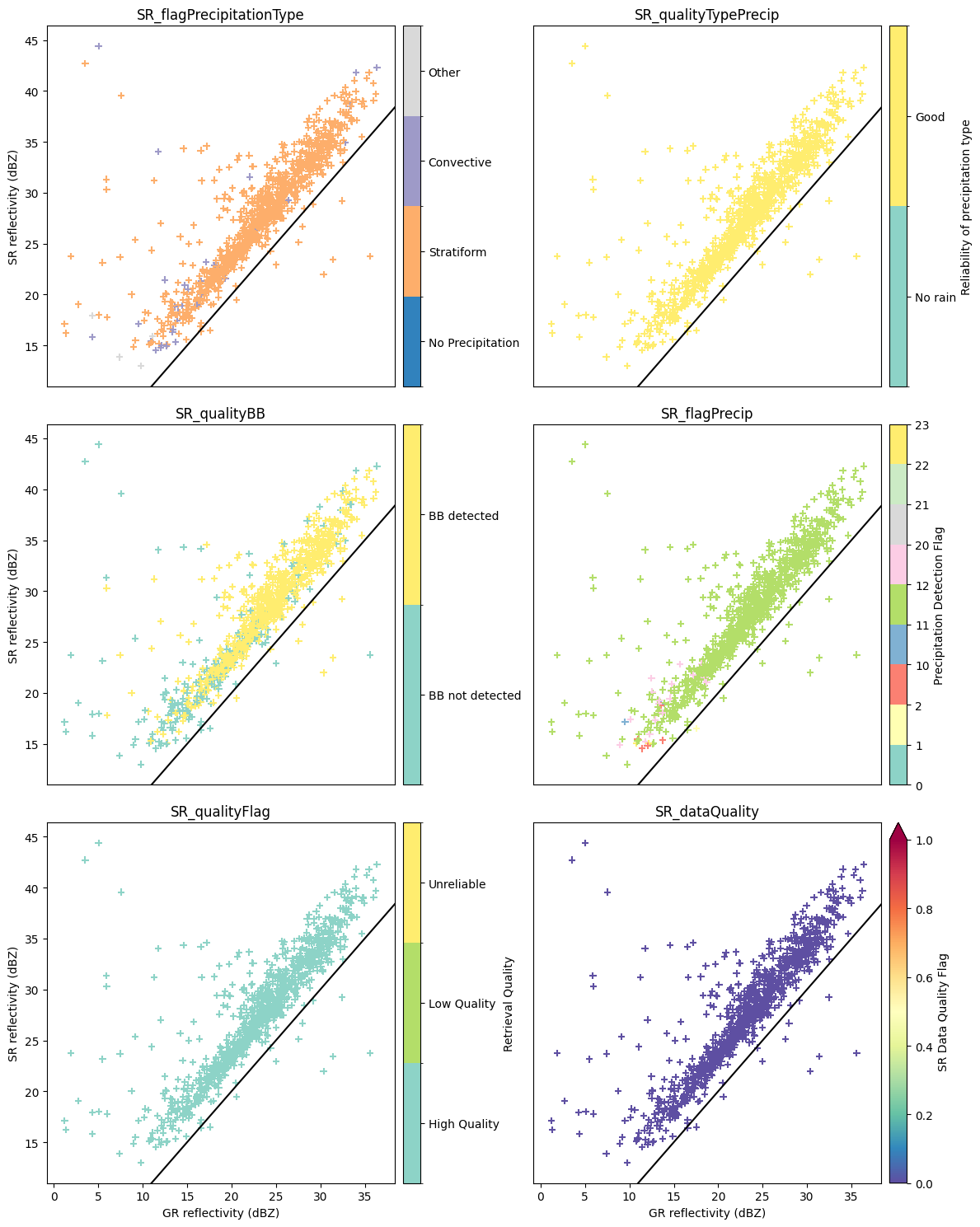
When comparing SR and GR data or trying to determine an accurate GR calibration bias, it’s necessary to define a set of filtering criteria. In the figures below, we perform exploratory data analysis to investigate the relationships between the SR/GR reflectivity deviations and sets of variables characterizing radar measurements and SR/GR volume properties. The patterns and deviations observed in the scatterplots will be used to define a set of filtering critera in the next section of the tutorial.
[ ]:
# Matching characteristics
hue_columns = [
"VolumeRatio",
"VolumeDiff",
"GR_vres_max",
"GR_range_max",
"GR_gate_volume_sum",
"SR_gate_volume_sum",
"SR_vres_sum",
"GR_fraction_covered_area",
]
fig = reflectivity_scatterplots(
df=gdf_match,
gr_z_column=gr_z_column,
sr_z_column=sr_z_column,
hue_columns=hue_columns,
ncols=2,
)
fig.tight_layout()
[ ]:
# Value validity & sensitivity
hue_columns = [
"GR_counts",
"GR_counts_valid",
"SR_counts",
"SR_counts_valid",
]
fig = reflectivity_scatterplots(
df=gdf_match,
gr_z_column=gr_z_column,
sr_z_column=sr_z_column,
hue_columns=hue_columns,
ncols=2,
)
fig.tight_layout()
hue_columns = [
"SR_zFactorFinal_Ku_fraction_above_12dBZ",
"SR_zFactorFinal_Ku_fraction_above_14dBZ",
"GR_Z_fraction_above_10dBZ",
"GR_Z_fraction_above_12dBZ",
]
fig = reflectivity_scatterplots(
df=gdf_match,
gr_z_column=gr_z_column,
sr_z_column=sr_z_column,
hue_columns=hue_columns,
ncols=2,
)
fig.tight_layout()
[ ]:
# NUBF & Variability
hue_columns = [
"SR_zFactorFinal_Ku_range",
"GR_Z_range",
"SR_zFactorFinal_Ku_std",
"GR_Z_std",
"SR_zFactorFinal_Ku_cov",
"GR_Z_cov",
]
fig = reflectivity_scatterplots(
df=gdf_match,
gr_z_column=gr_z_column,
sr_z_column=sr_z_column,
hue_columns=hue_columns,
ncols=2,
)
fig.tight_layout()
[ ]:
# Attenuation
hue_columns = [
"SR_pathAtten",
"SR_piaFinal",
"SR_zFactorCorrection_Ku_max",
"SR_zFactorCorrection_Ku_mean",
"SR_reliabFlag",
"GR_Z_cumsum_max",
]
fig = reflectivity_scatterplots(
df=gdf_match,
gr_z_column=gr_z_column,
sr_z_column=sr_z_column,
hue_columns=hue_columns,
ncols=2,
)
fig.tight_layout()
[ ]:
# Hydrometeors
hue_columns = [
"SR_fraction_no_precip",
"SR_fraction_clutter",
"SR_fraction_rain",
"SR_fraction_snow",
"SR_fraction_hail",
"SR_fraction_below_isotherm",
"SR_fraction_above_isotherm",
"SR_fraction_melting_layer",
# 'SR_airTemperature_min',
]
fig = reflectivity_scatterplots(
df=gdf_match,
gr_z_column=gr_z_column,
sr_z_column=sr_z_column,
hue_columns=hue_columns,
ncols=2,
)
fig.tight_layout()
[ ]:
# SR Quality Flags
hue_columns = [
"SR_flagPrecipitationType",
"SR_qualityTypePrecip",
"SR_qualityBB",
"SR_flagPrecip",
"SR_qualityFlag",
"SR_dataQuality",
]
fig = reflectivity_scatterplots(
df=gdf_match,
gr_z_column=gr_z_column,
sr_z_column=sr_z_column,
hue_columns=hue_columns,
ncols=2,
)
fig.tight_layout()
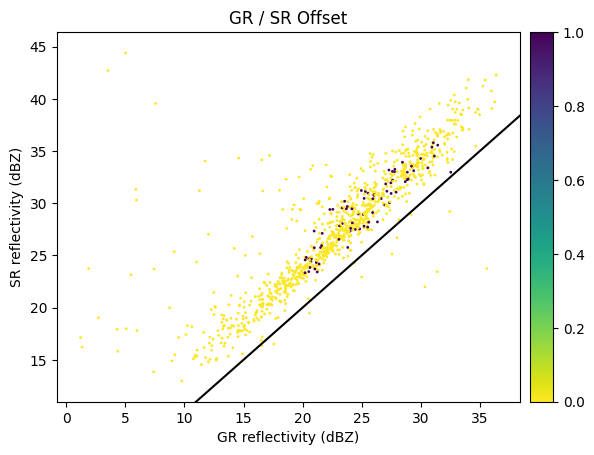
Define SR/GR filtering criteria#
When calibrating or comparing SR and GR data, there is a necessary tradeoff between the strictness of filtering criteria filtering and the number of available samples. Here below we provide some general recommendations for effective filtering:
Sensitivity Thresholds: Retain only those radar beams where the aggregated gate reflectivities exceed the instrument sensitivities. The
GR_Z_fraction_above_<thr>dBZandSR_zFactorFinal_Ku_fraction_above_<thr>dBZvariables can be used filter the samples.Stratiform Precipitation: If the purpose of your analysis is to assess the calibration bias of GR data, it is suggested to focus on stratiform precipitation that ocurrs outside the melting layer (i.e. avoiding the bright band). Only stratiform samples above the melting layer are used in ground validation of the GPM DPR (W. Petersen 2017, personal communication). Convective SR footprints are typically excluded to avoid dealing with:
the high spatial variability in the precipitation field and issues with non-uniform beam filling (NUBF),
the potential biases introduced by the SR attenuation correction,
the potential biases in GR reflectivities, especially at C and X band, due to beam attenuation,
the multiple scattering signature caused by hail particles.
Reflectivity Range: According to Warren et al. (2018), volume-averaged SR and GR reflectivity values should be selected within the range of 24 to 36 dBZ. This range minimizes the impact of low SR sensitivity, SR beam attenuation and non-rayleigh scattering effects.
Clutter Removal: Exclude SR/GR samples that are contaminated by ground clutter, anomalous propagation, or beam blockage.
Volume matching: Exclude SR/GR samples where there are excessive differences in the total gate volume.
[ ]:
def filter_matched_volumes(gdf_match, sr_z_range, gr_z_range, radar_band, display_mask=False):
# Define masks
masks = [
# Select SR scan with "normal" dataQuality (for entire cross-track scan)
gdf_match["SR_dataQuality"] == 0,
# Select SR beams with detected precipitation
gdf_match["SR_flagPrecip"] > 0,
# Select only 'high quality' SR data
# - qualityFlag == 1 indicates low quality retrievals
# - qualityFlag == 2 indicates bad/missing retrievals
gdf_match["SR_qualityFlag"] == 0,
# Select only SR beams with detected bright band
gdf_match["SR_qualityBB"] == 1,
# Select only beams with confident precipitation type
gdf_match["SR_qualityTypePrecip"] == 1,
# Select only stratiform precipitation
# - SR_flagPrecipitationType == 2 indicates convective
gdf_match["SR_flagPrecipitationType"] == 1,
# Select only SR beams with reliable attenuation correction
gdf_match["SR_reliabFlag"].isin((1, 2)), # or == 1
# Select only beams with reduced path attenuation
# gdf_match["SR_zFactorCorrection_Ku_max"]
# gdf_match["SR_piaFinal"]
# gdf_match["SR_pathAtten"]
# Select only SR beams with matching SR gates with no clutter
gdf_match["SR_fraction_clutter"] < 0.1,
# Select only SR beams with matching SR gates not in the melting layer
gdf_match["SR_fraction_melting_layer"] == 0,
# Select only SR beams with matching SR gates with precipitation
gdf_match["SR_fraction_no_precip"] < 0.1,
# Select only SR beams with matching SR gates with no hail
gdf_match["SR_fraction_hail"] == 0,
# Select only SR beams with matching SR gates with rain
# gdf_match["SR_fraction_rain"] == 1,
# Select only SR beams with matching SR gates with snow
# gdf_match["SR_fraction_snow"] == 1,
# Select SR beams only within given GR radius interval
# - Crisologo et al., 2018, Warren et al., 2018
gdf_match["GR_range_min"] > 15_000,
gdf_match["GR_range_max"] < 115_000,
# Discard SR beams where scanning time difference > 5 minutes
# - time_difference is in seconds !
gdf_match["time_difference"] < 60 * 5,
# Discard SR beams where GR gates does not cover 80% of the horizontal area
gdf_match["GR_fraction_covered_area"] > 0.8,
# Select only SR beams with detected bright band
# - This can remove lot of matched volumes !
# - We can just discard gates in the BB
# - Schwaller et al., 2011: only stratiform rain above brightband
# gdf_match["SR_qualityBB"] == 1,
# Select only SR gates with snow
# gdf_match["SR_fraction_above_isotherm"] == 1,
# Select only interval of reflectivities
# - Crisologo et al., 2018, Warren et al., 2018: between 24 and 36 dBZ
# - Schwaller et al., 2011: SR above 18 dBZ, GR: 15 dBZ (-3 dBZ error allowance)
# --> Iterative filtering based on bias-corrected reflectivity (Protat et al., 2011)
gdf_match[f"SR_zFactorFinal_{radar_band}_mean"] > sr_z_range[0],
gdf_match[f"SR_zFactorFinal_{radar_band}_mean"] < sr_z_range[1],
gdf_match["GR_Z_mean"] > gr_z_range[0],
gdf_match["GR_Z_mean"] < gr_z_range[1],
# Select SR gates above minimum reflectivity
# - 0.7 in Crisologo et al., 2018 and Warren et al., 2018
# - 0.95 in Schwaller et al., 2011
# gdf_match["SR_zFactorFinal_Ku_fraction_above_12dBZ"] > 0.95,
# Select SR gates with GR above minimum reflectivity
# - 0.7 in Crisologo et al., 2018
# gdf_match["GR_Z_fraction_above_12dBZ"] > 0.95,
# Discard SR beams with high NUBF
# gdf_match["SR_zFactorFinal_Ku_range"] > 5,
# gdf_match["SR_zFactorFinal_Ku_cov"] < 0.5,
# gdf_match["GR_Z_cov"] < 0.5,
# gdf_match["GR_Z_range"] < 15,
# # Filter footprints where volume ratio exceeds 60
# gdf_match["VolumeRatio"] > 60,
# TODO Filter footprints where GR affected by beam blockage
]
# Define final mask
mask_final = reduce(np.logical_and, masks)
gdf_match["filtering_mask"] = mask_final
# Dsplay final filtering mask
if display_mask:
reflectivity_scatterplots(
df=gdf_match,
gr_z_column="GR_Z_mean",
sr_z_column=f"SR_zFactorFinal_{radar_band}_mean",
hue_columns="filtering_mask",
marker="o",
s=1,
cmap="viridis_r",
)
# Return filtered database
gdf_filtered = gdf_match[mask_final]
return gdf_filtered
Now let’s filter the SR/GR database using the criteria defined above:
[ ]:
gdf_filtered = filter_matched_volumes(
gdf_match,
sr_z_range=(20, 36),
gr_z_range=(20, 36),
radar_band=radar_band,
display_mask=True,
)
Analyze filtered SR/GR database#
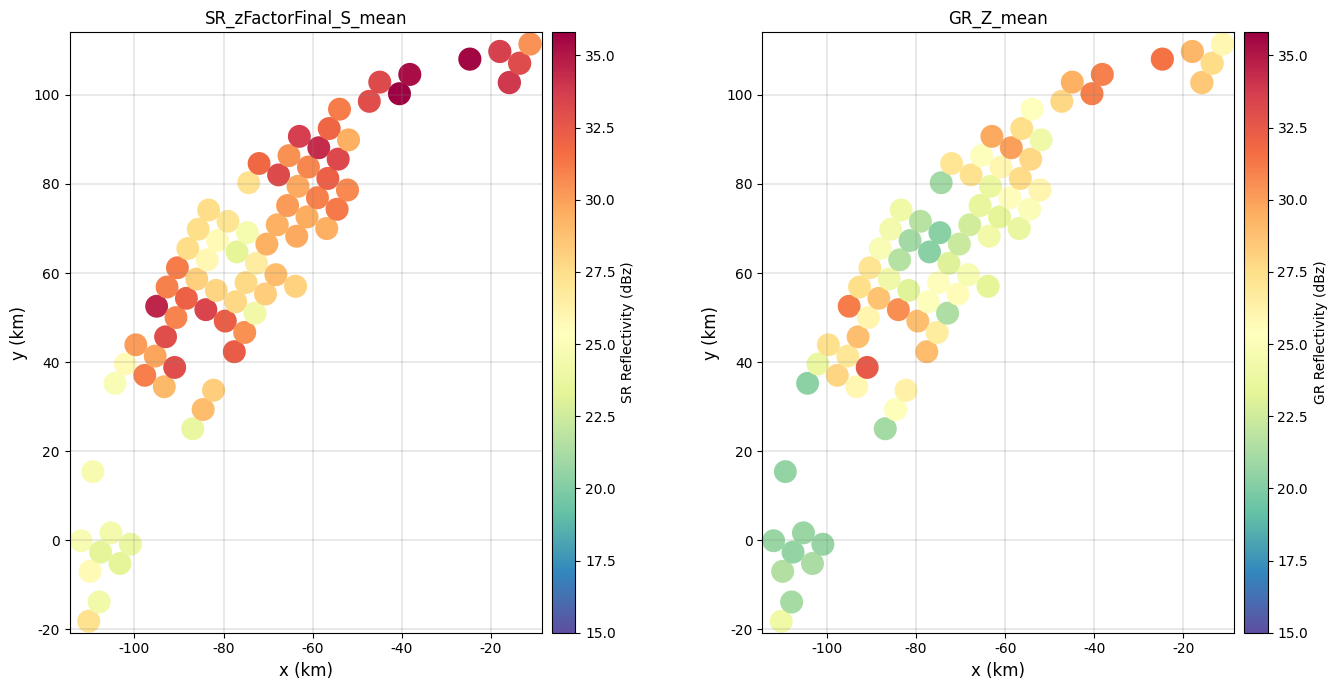
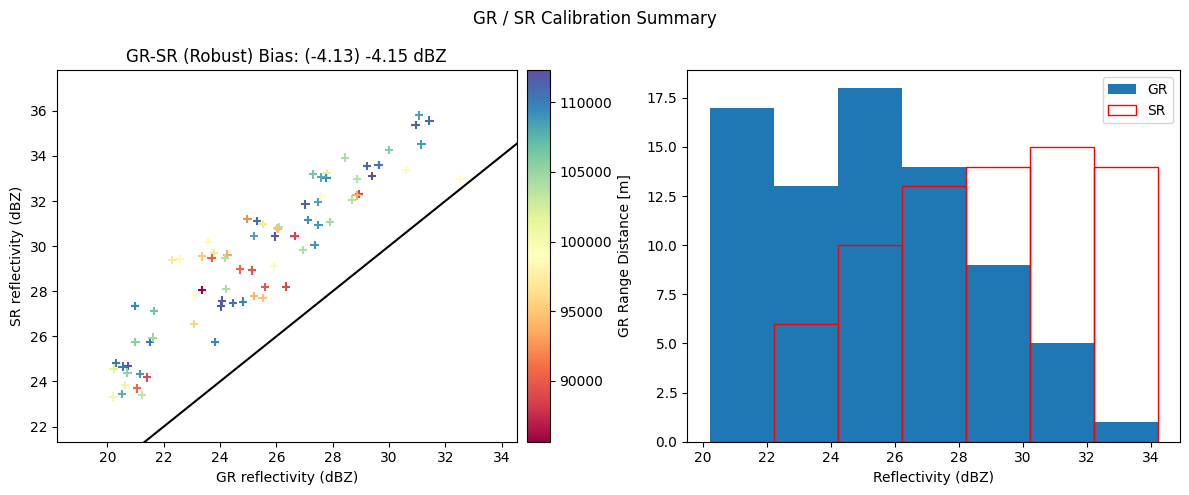
We now analyze teh filtered SR/GR Database, comparing the reflectivity fields and displaying the new calibration summary:
[ ]:
fig = compare_maps(
gdf_filtered,
sr_column=sr_z_column,
gr_column=gr_z_column,
sr_label="SR Reflectivity (dBz)",
gr_label="GR Reflectivity (dBz)",
cmap="Spectral_r",
unified_color_scale=True,
vmin=15,
# vmax=40
)
fig.tight_layout()
[ ]:
fig = calibration_summary(
df=gdf_filtered,
sr_z_column=sr_z_column,
gr_z_column=gr_z_column,
# Histogram options
bin_width=2,
# Scatterplot options
# hue_column="GR_gate_volume_sum",
hue_column="GR_range_mean",
# gr_range=[15, 50]
# sr_range=[15, 50]
marker="+",
cmap="Spectral",
)
fig.tight_layout()
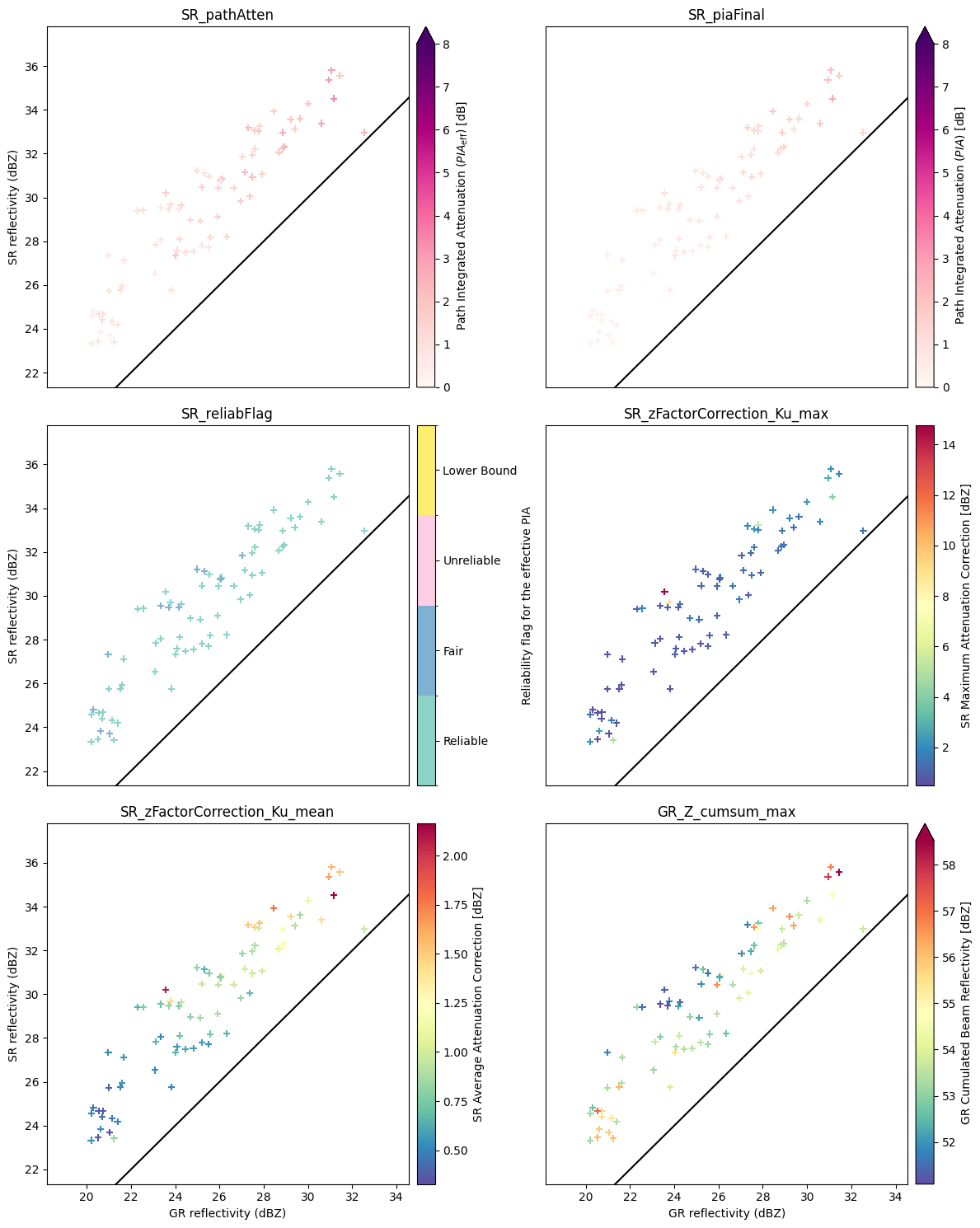
Exploratory data analysis can again be performed to check if the filtering criteria were effective to discard the undesired SR/GR matched volumes and if the filtering criteria should be further expanded.
[ ]:
# Attenuation
hue_columns = [
"SR_pathAtten",
"SR_piaFinal",
"SR_reliabFlag",
"SR_zFactorCorrection_Ku_max",
"SR_zFactorCorrection_Ku_mean",
"GR_Z_cumsum_max",
]
fig = reflectivity_scatterplots(
df=gdf_filtered,
gr_z_column=gr_z_column,
sr_z_column=sr_z_column,
hue_columns=hue_columns,
ncols=2,
)
fig.tight_layout()
Determine GR calibration offset#
A naive estimate of the GR calibration bias can be obtained by averaging the difference between the matched SR/GR reflectivity measurements:
[ ]:
# Compute average offset
offset_mean = np.nanmean(gdf_filtered[gr_z_column] - gdf_filtered[sr_z_column]).round(2)
offset_median = np.nanmedian(gdf_filtered[gr_z_column] - gdf_filtered[sr_z_column]).round(2)
print(f"The mean ZH Calibration offset is: {offset_mean} dBZ")
print(f"The median ZH Calibration offset is: {offset_median} dBZ")
The mean ZH Calibration offset is: -4.15 dBZ
The median ZH Calibration offset is: -4.13 dBZ
However, iterative calculations are recommended. The reason is that volume-filtering select gates within specific reflectivity values ranges. In presence of non-zero calibration offset, samples are incorrectly included/excluded from the offset calculation, biasing the estimate.
Here below we provide an example of iterative filtering and calibration bias estimation:
[ ]:
# Define GR and SR variables
sr_z_column = f"SR_zFactorFinal_{radar_band}_mean"
gr_z_column = "GR_Z_mean"
# Define number of iterations
max_iterations = 10
[ ]:
# Define reflectivity thresholds bounds for each iteration
sr_z_range_start = (18, 38)
sr_z_range_stop = (24, 36)
gr_z_range_start = (18, 38)
gr_z_range_stop = (24, 36)
sr_z_ranges = list(
zip(
np.linspace(sr_z_range_start[0], sr_z_range_stop[0], num=max_iterations),
np.linspace(sr_z_range_start[1], sr_z_range_stop[1], num=max_iterations),
strict=False,
),
)
gr_z_ranges = list(
zip(
np.linspace(gr_z_range_start[0], gr_z_range_stop[0], num=max_iterations),
np.linspace(gr_z_range_start[1], gr_z_range_stop[1], num=max_iterations),
strict=False,
),
)
sr_z_ranges.append(sr_z_range_stop)
gr_z_ranges.append(gr_z_range_stop)
[ ]:
# Define initial offset
offset_mean = 0
offset_median = 0
# Iterate and update the offset
list_offset = []
for i in range(0, max_iterations):
df = gdf_match.copy()
df[gr_z_column] = df[gr_z_column] - offset_median
df = filter_matched_volumes(df, sr_z_range=sr_z_ranges[i], gr_z_range=gr_z_ranges[i], radar_band=radar_band)
delta_z = df[gr_z_column] - df[sr_z_column]
offset_mean += np.nanmean(delta_z)
offset_median += np.nanmedian(delta_z)
list_offset.append(offset_median)
offset_mean = offset_mean.round(2)
offset_median = offset_median.round(2)
[ ]:
print(f"The mean ZH Calibration offset is: {offset_mean} dBZ")
print(f"The median ZH Calibration offset is: {offset_median} dBZ")
The mean ZH Calibration offset is: -5.61 dBZ
The median ZH Calibration offset is: -4.31 dBZ
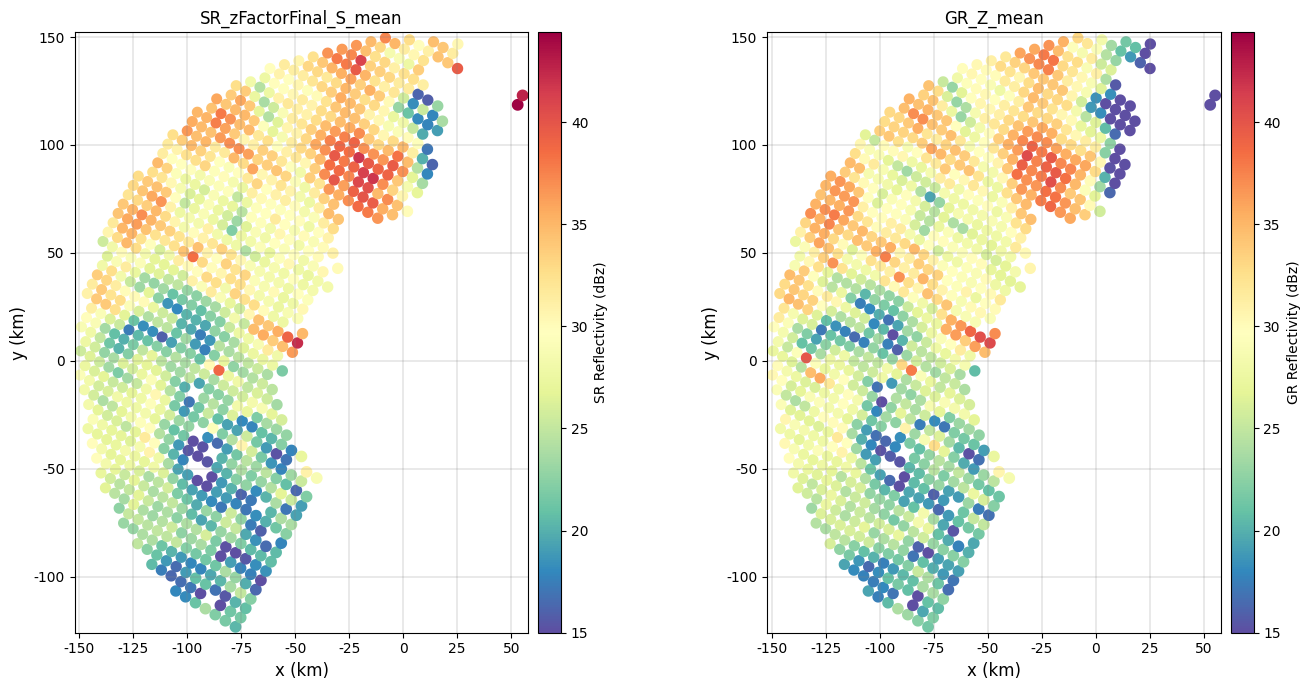
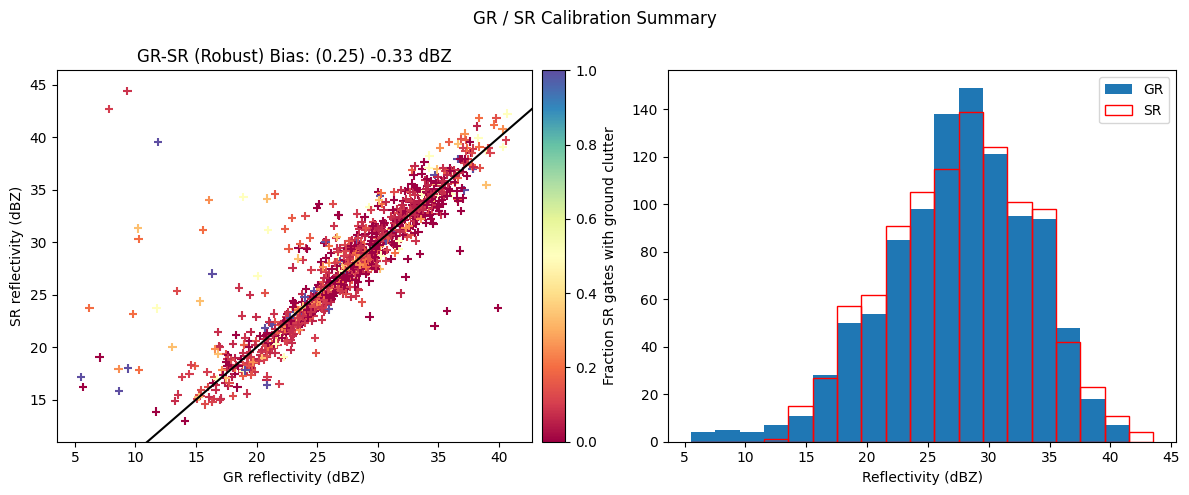
We can now substract the calibration offset from the GR/SR matched database and compare the resulting reflectivity fields:
[ ]:
# Unbias GR reflectivity
gdf_matched_unbiased = gdf_match.copy()
gdf_matched_unbiased[gr_z_column] = gdf_matched_unbiased[gr_z_column] - offset_median
# Plot reflectivity fields
fig = compare_maps(
gdf_matched_unbiased,
sr_column=sr_z_column,
gr_column=gr_z_column,
sr_label="SR Reflectivity (dBz)",
gr_label="GR Reflectivity (dBz)",
cmap="Spectral_r",
unified_color_scale=True,
vmin=15,
# vmax=40
)
fig.tight_layout()
[ ]:
# Display calibration summary
fig = calibration_summary(
df=gdf_matched_unbiased,
gr_z_column=gr_z_column,
sr_z_column=sr_z_column,
# Histogram options
bin_width=2,
# Scatterplot options
hue_column="SR_fraction_clutter",
marker="+",
cmap="Spectral",
)
fig.tight_layout()
Volume matching with calibrated GR#
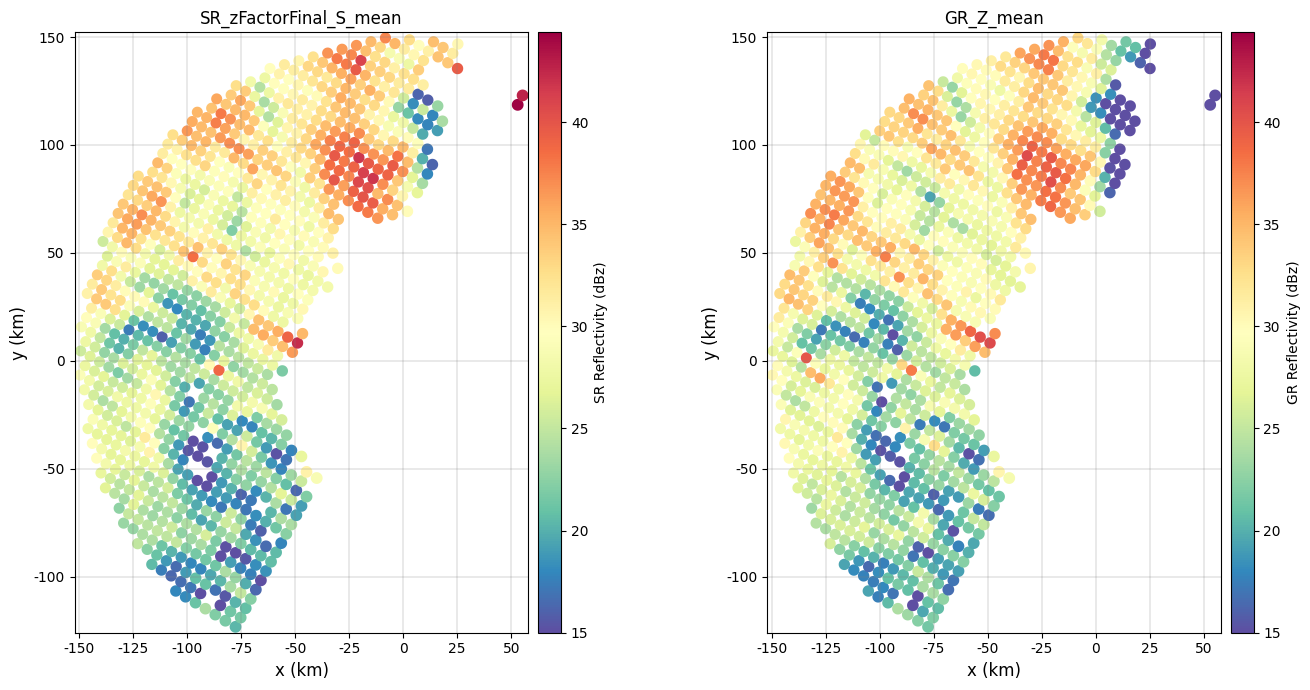
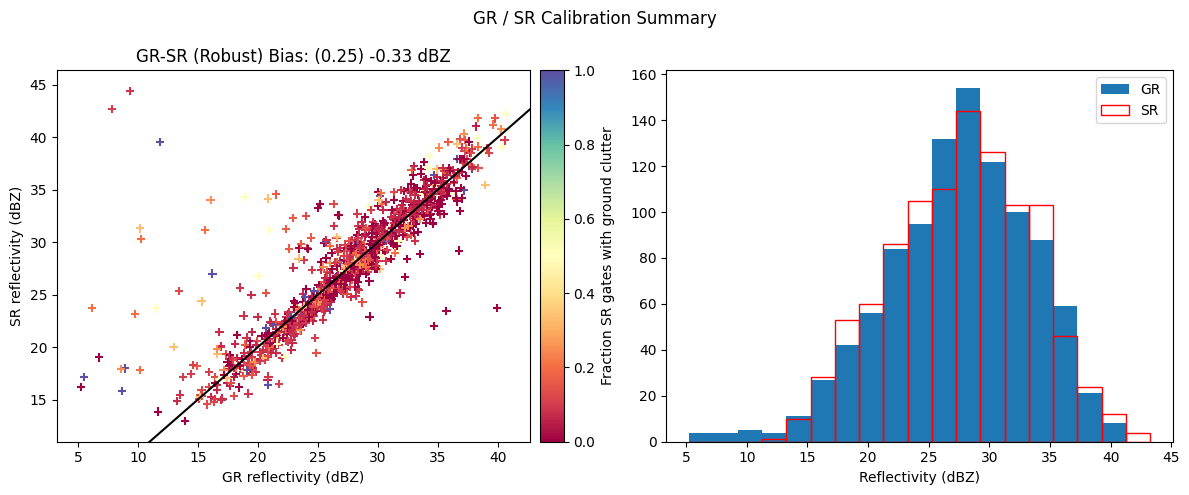
Now, we remove the estimated GR calibration bias from the original GR data, we rerun the SR/GR volume matching procedure, we compare the matched reflectivities and we assess if we have effectively removed the bias by generating the calibration summar
[ ]:
# Apply offset
ds_gr["DBZH_c"] = ds_gr["DBZH"] - offset_median
[ ]:
# Apply matching
gdf_match_corrected = volume_matching(
ds_gr=ds_gr,
z_variable_gr="DBZH_c",
radar_band=radar_band,
beamwidth_gr=beamwidth_gr,
z_min_threshold_gr=z_min_threshold_gr,
z_min_threshold_sr=z_min_threshold_sr,
min_gr_range=0,
max_gr_range=150_000,
# gr_sensitivity_thresholds=None,
# sr_sensitivity_thresholds=None,
download_sr=False, # require internet connection !
)
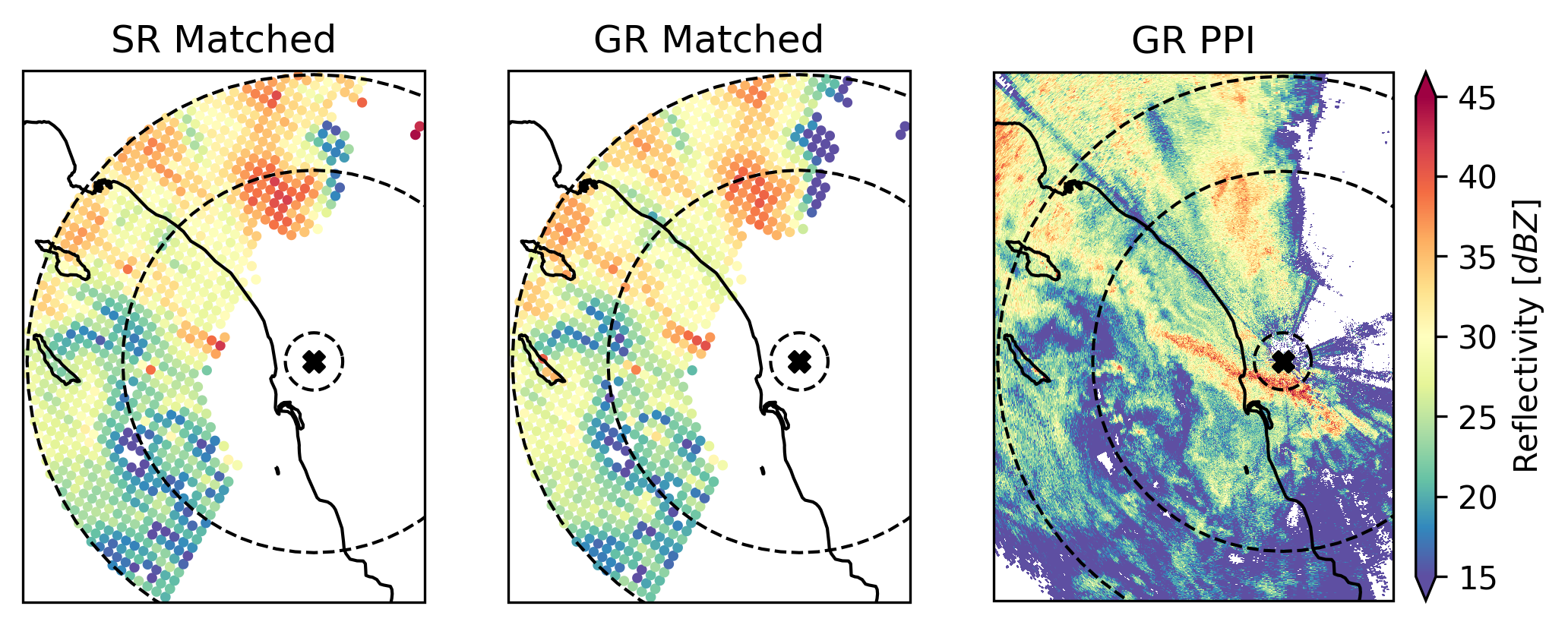
SR/GR Matching Elapsed time: 0:00:48.217795 .
[ ]:
# Compare reflectivities
fig = compare_maps(
gdf_match_corrected,
sr_column=sr_z_column,
gr_column=gr_z_column,
sr_label="SR Reflectivity (dBz)",
gr_label="GR Reflectivity (dBz)",
cmap="Spectral_r",
unified_color_scale=True,
vmin=15,
# vmax=40
)
fig.tight_layout()
[ ]:
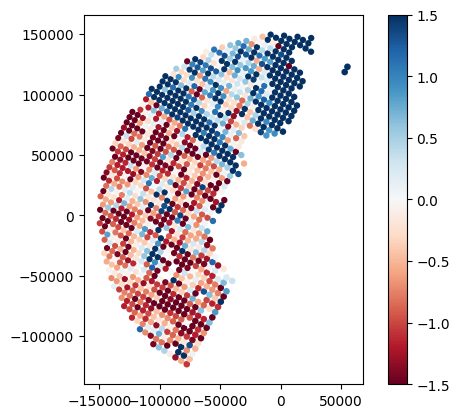
# Display difference in reflectivity betweeen SR and GR
gdf_match_corrected["z_offset"] = gdf_match_corrected[sr_z_column] - gdf_match_corrected[gr_z_column]
gdf_match_corrected.plot(column="z_offset", legend=True, cmap="RdBu", vmin=-1.5, vmax=1.5)
<Axes: >
[ ]:
# Display calibration summary
fig = calibration_summary(
df=gdf_match_corrected,
gr_z_column=gr_z_column,
sr_z_column=sr_z_column,
# Histogram options
bin_width=2,
# Scatterplot options
hue_column="SR_fraction_clutter",
marker="+",
cmap="Spectral",
)
fig.tight_layout()
Next steps#
We encourage you to explore and adapt the code provided in this tutorial to infer calibration bias also for the vertically polarized channel, iterate over GR sweeps, analyze multiple GPM overpasses, and assess the long-term calibration bias of your GR network.
Please share any insights or suggestions for improving the matching procedure or filtering criteria with the GPM-API community so we can collaboratively enhance the routines.
We hope you enjoyed the tutorial! 😊
References#
Citation#
This notebook is part of the GPM-API documentation.
Large portions of this tutorials were adapted and derived from an old \(\omega radlib\) tutorial.
Copyright: \(\omega radlib\) and GPM-API developers. Distributed under the MIT License. See GPM-API license for more info.